Showing posts with label Lysiange tube. Show all posts
Showing posts with label Lysiange tube. Show all posts
Tuesday, March 14, 2017
Spunky Spring

This tutorial is my property, written by
Jeannine’sTag,
any resemblance to another tutorial is a
coincidence.
Do not share my tutorial, send a link to my blog.
Supplies Needed:
PSP 9 (any version should work).
Scrapkit
“Butterfly” by Chachaz Creationz
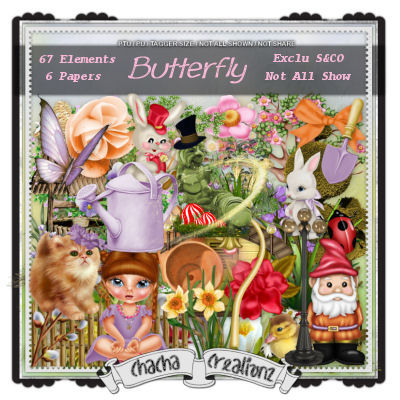
Can
be found here
Tube
of choice mine is “Mrs Burtterfly” by Lysisange

You
may not use this tube without licence
Template
Spunky Spring by Millie
Font
of choice
Drop shadow: 2 - 2 – 50 – 7
Open template – remove credit – image canvas size
800 x 800
Background - select all – c/p paper 6 – apply the
mask – layers – merge group
Highlight
1
& 3 – selection float – defloat - open paper 1 – copy & paste as new
layer – selection invert – delete – add drop shadow
7
& 8 – selection float – defloat - open paper 6 – copy & paste as new
layer – selection invert – delete – add drop shadow
For
the others layer – adjust – color balance – manual color correction – choice colors
from kit or tube
Open
elements and resize (if needed):
Never work on the original design -
always shift D
(Be careful when you
resize or
rotate it is
sometimes necessary to sharpen)
25
– width 550
43
– width 400
60
– width 300
63
– width 400
15
– width 300
58
– width 250
36
– width 200
64
– width 170
9
– width 200
61
– width 85
37
– width 100
67
– width 85
22
– width 80
7
– width 80
41
– width 50
45
– width 80
5
– width 120
Place
all items (look at my tag for example)
Copy - Paste your tube as new layer. Resize if need
it.
Add copyright info. Merge visible.
Add your name and give a little Inner Bevel effect
Enjoy
this tutorial and I'd like to see your results, you can email
me
Thursday, December 1, 2016
Christmas Happiness

This tutorial is my property, written by
Jeannine’sTag,
any resemblance to another tutorial is a
coincidence.
Do not share my tutorial, send a link to my blog.
Supplies Needed:
PSP 9 (any version should work).
Scrapkit
“Black and White” from Chachaz Creationz

Can
be found here:
Tube
of choice
Mine
is “Book Of Christmas” by Lysisange

You may not use this tube without licence
Buy
the tube here: http://scrapsncompany.com/index.php?main_page=product_info&cPath=113_562&products_id=24450
Template
Chally by Dee
Mask
of choice
Font
of choice
Drop shadow: 2 - 2 – 50 – 7
Lets get
started…..!
Open template – remove credit– image canvas size
800 x 800
Background - select all – c/p paper 4 – apply the
mask – layers – merge group
Highlight
7
– xero fritillary
Purple
rectangle – selection float – defloat - open paper 1 – copy & paste as new
layer – selection invert – delete – add drop shadow
Blue
circle – selection float – defloat - open paper 4 – copy & paste as new
layer – selection invert – delete – add drop shadow
Beige
square – selection float – defloat - open paper 1 – copy & paste as new
layer – selection invert – delete – add drop shadow
Open
elements and resize (if needed):
Never work on the original design -
always shift D
(Be careful when you
resize or
rotate it is
sometimes necessary to sharpen)
42
– original size
35
– width 200
58
– width 150
61
– width 120
27
– width 300
33
– width 250
15
– width 200
29
– width 220
19
– width 150
3
– width 170
1
– width 120
20
– width 150 – duplicate – rotate free the first shoe right 15°
70
– width 75 – image mirror
Place
all items (look at my tag for example)
Copy - Paste your tube as new layer. Resize if need
it.
Add copyright info. Merge visible.
Add your name and give a little Inner Bevel effect
Enjoy
this tutorial and I'd like to see your results, you can email
me
Thursday, November 17, 2016
Christmas Dream's

This tutorial is my property, written by
Jeannine’sTag,
any resemblance to another tutorial is a
coincidence.
Do not share my tutorial, send a link to my blog.
Do not share my tutorial, send a link to my blog.
Supplies Needed:
PSP 9 (any version should work).
Scrapkit
“Christmas Dream’s” from Chachaz Creationz

Can
be found here:
Tube
of choice
Mine
is “Chrismas Meryl” by Lysisange

You may not use this tube without licence
Buy
the tube here: http://scrapsncompany.com/index.php?main_page=product_info&cPath=113_562&products_id=15797&zenid=3v21lnt3p7l4kb7la5ovv4u146
Template
721 by Millie
Mask
of choice
Font
of choice
Drop shadow: 2 - 2 – 50 – 7
Lets get
started…..!
Open template – remove credit– image canvas size
800 x 800
Background - select all – c/p paper 3 – apply the
mask – layers – merge group
Highlight
1,
2, 6, 7 – xero fritillary
4
& 5 – selection float – defloat - open paper 1 – copy & paste as new
layer – selection invert – delete – add drop shadow
11
– selection float – defloat - open paper 5 – copy & paste as new layer –
selection invert – delete – add drop shadow
12
– selection float – defloat - open paper 6 – copy & paste as new layer –
selection invert – delete – add drop shadow
Open
elements and resize (if needed):
Never work on the original design -
always shift D
(Be careful when you
resize or
rotate it is
sometimes necessary to sharpen)
02
– width 150
3
– original size
94
– width 300
96
– width 550
13
– width 450
99
– width 120
61
– width 150
90
– width 100
93
– width 120
37
– width 120
36
– width 120
1
– width 280
88
– width 180
82
– width 180
11
– width 100
22
– width 120
23
– width 120
7
– width 85
20
– width 65
68
– width 150
Place
all items (look at my tag for example)
Copy - Paste your tube as new layer. Resize if need
it.
Add copyright info. Merge visible.
Add your name and give a little Inner Bevel effect
Enjoy
this tutorial and I'd like to see your results, you can email
me
Monday, May 30, 2016
Diva Licious

This tutorial is my property, written by
Jeannine’sTag,
any resemblance to another tutorial is a
coincidence.
Do not share my tutorial, send a link to my blog.
Do not share my tutorial, send a link to my blog.
Supplies Needed:
PSP 9 (any version should work).
Tube
of choice
Mine
is gorgeous tube "Dreamy Doll 2” made by Lysisange

You
may not use this tube without licence
Can
be found here: http://scrapsncompany.com/index.php?main_page=product_info&cPath=113_562&products_id=20132
PTU
scrap kit "Always on my Mind” by Disturbed Scraps

Can
be found here: http://scrapsncompany.com/index.php?main_page=product_info&cPath=112_411_120&products_id=20064
Template
635 by Millie
Font
of choice
Plugin
Xero Fritillary
Drop shadow: 2 - 2 – 50 – 7
Lets get
started…..!
Open template – remove credit– image canvas size
800 x 800
Background - select all – c/p paper 13 – apply the
mask – layers – merge group
Highlight
7
& 8 – adjust – color balance – manual color correction – choice a dark
purple – xero fritillary
1
– selection float – defloat - open paper 2 – copy & paste as new layer –
selection invert – delete – add drop shadow
2
& 3 – selection float – defloat - open paper 6 – copy & paste as new
layer – selection invert – delete – add drop shadow
4
– selection float – defloat - open paper 12 – copy & paste as new layer –
selection invert – delete – add drop shadow
6
– selection float – defloat - open paper 13 – copy & paste as new layer –
selection invert – delete – add drop shadow
Open
elements and resize (if needed):
Never work on the original design -
always shift D
(Be careful when you
resize or
rotate it is
sometimes necessary to sharpen)
64
– original size
60
– original size
4
– width 350
13
– width 200
47
– width 500
34
– width 150
62
– width 100
51
– width 135
50
– width 150
6
– width 300
49
– width 150
52
– width 150
20
– width 250
18
– width 70
56
– width 70
59
– width 75
37
– width 80
53
– width 45
35
– width 100
68
– original size
Place
all items (look at my tag for example)
Copy - Paste your tube as new layer. Resize if need
it.
Add copyright info. Merge visible.
Add your name and give a little Inner Bevel effect
Enjoy
this tutorial and I'd like to see your results, you can email
me
Tuesday, May 17, 2016
Orchid's Garden

This
tutorial is my property, written by Jeannine’sTag,
any
resemblance to another tutorial is a coincidence.
Do not share my tutorial, send a link to my blog.
Do not share my tutorial, send a link to my blog.
Supplies
Needed:
PSP 9 (any version should work).
Tube of choice
Mine is gorgeous tube "Orchidee” by
Lysisange

You may not use this tube without licence
Here:
Matching PTU scrap kit "Orchidee” by
Rieneke Designs

Here:
Font of choice
Drop
shadow: 2 - 2 – 50 – 7
Lets get started…..!
Open new
image 800 x 800 - select all – c/p paper 3 – apply the mask – layers – merge
group
Open frame
(32) click inside the frame with magic wand – selection modify – expand 7 –
c&p the face from tube – selection invert delete – layer arrange – move down
– effect xero porcelain – texture effect – blind like this

Open elements and resize (if needed):
Never
work on the original design - always shift D
(Be careful when you resize or rotate it is sometimes necessary to sharpen)
41 – width 100
35 – width 300
38 – width 100
40 – width 300
47 – width 400
16 – width 300
8 – width 300
3 – width 300
36 – original size
54 – width 150
15 – width 250
55 – width 120
12 – width 200
34 – width 200
33 – width 150
19 – width 120
42 – width 100
72 – width 180
22 – width 250
25 – width 450 – image mirror
46 – width 300
1 – width 150
9 – width 180
Place all items (look at my tag for
example)
Copy -
Paste your tube as new layer. Resize if need it.
Add
copyright info. Merge visible.
Add your
name and give a little Inner Bevel effect
Enjoy this tutorial and I'd like
to see your results, you can email me
Subscribe to:
Posts
(Atom)
My Blog List
-
-
NEWS6 years ago
-


